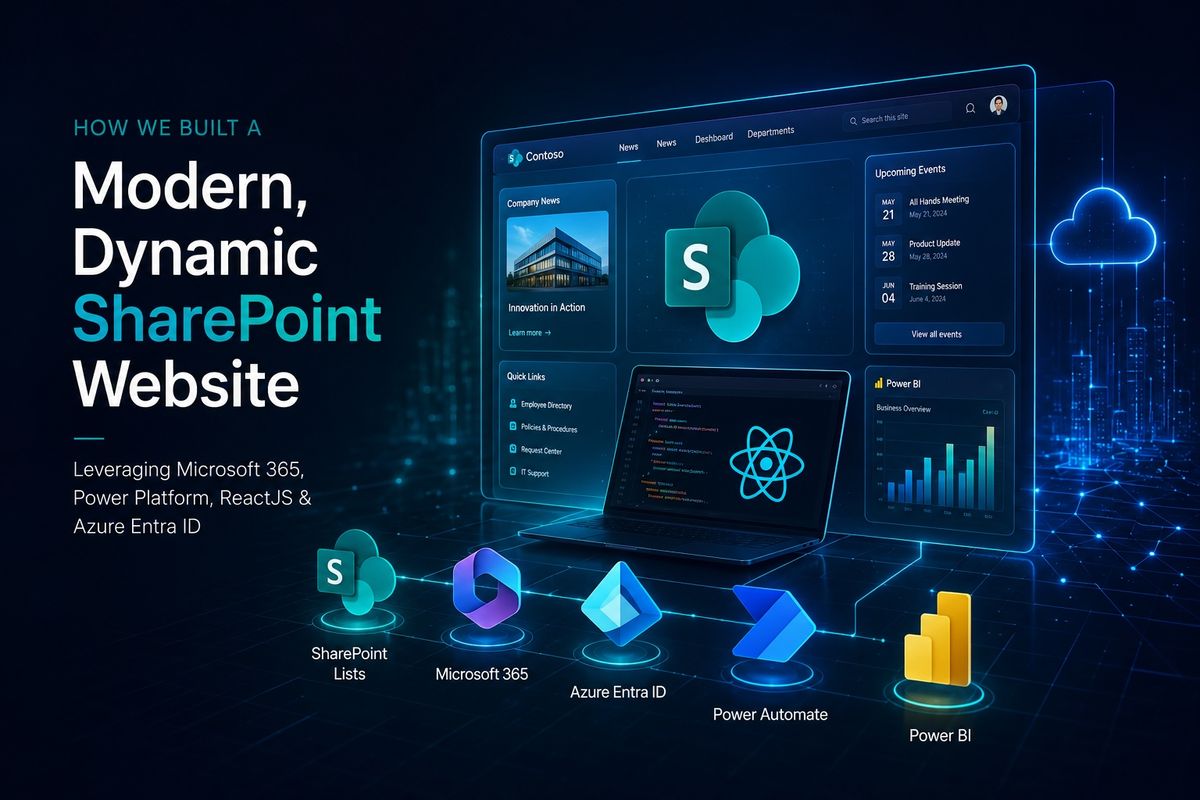
How We Built a Modern, Dynamic SharePoint Website

SharePoint is often seen as a place to store documents, publish announcements, and share information.
For this project, we wanted to take it further. The goal was to create a central platform for internal ISO compliance information and the processes that sit around it. Employees needed a clear place to find published policies, acknowledge the ones assigned to them, access training material, and follow their own deadlines. Administrators and process owners needed dedicated areas for managing policies, controls, evidence, risks, training, and reporting. Rather than treating those activities as separate tools, we brought them together within Microsoft 365. The result was a SharePoint website designed to make structured compliance work feel more connected, easier to follow, and easier to maintain over time.
SharePoint as the Foundation
Modern SharePoint pages provided the foundation, but the core of the experience came from custom SharePoint Framework web parts built with React. This allowed us to create focused interfaces around the work people actually needed to do, instead of sending them directly into raw Lists.
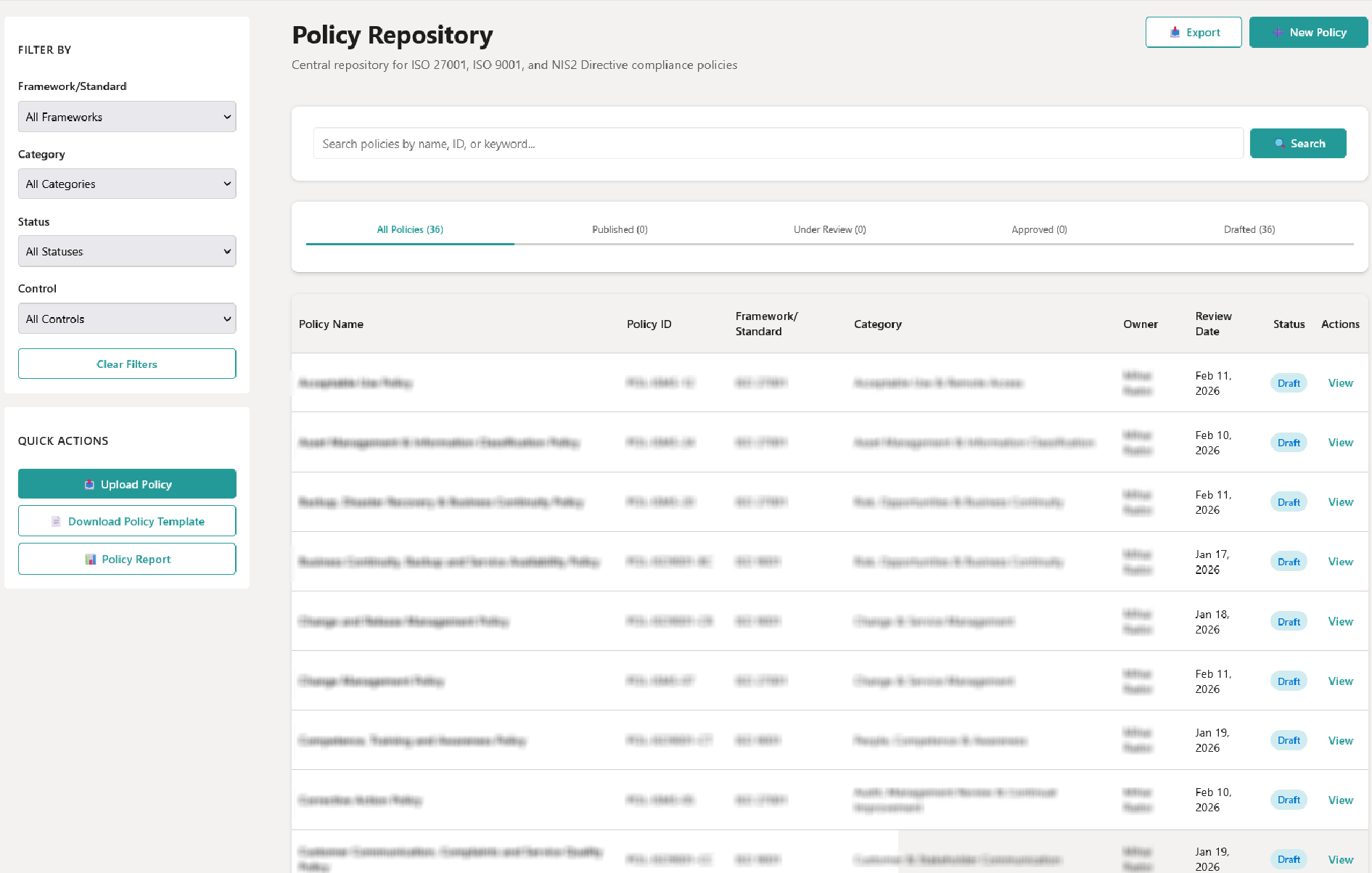
The portal includes dedicated experiences for policy management, controls, evidence, risks, training, dashboards, tools, and the homepage. A policy owner can create or update a policy, submit it for review, and follow it through approval and publishing. A reviewer can open a control or evidence item, add review notes, and update its status. A user can see assigned policies and training, confirm acknowledgment, and update training progress.
Behind these pages, SharePoint Lists provide the structured data layer. They store the records and relationships that make the portal work: policies, controls, risks, evidence metadata, training courses, assignments, events, categories, frameworks, and other reusable reference data. This keeps information consistent across the different web parts. A risk can be connected to relevant controls, evidence can be connected to a control and related policies, and training can be assigned to people or groups.
Document libraries complete the picture. Evidence files and training materials are stored in SharePoint, while the portal provides the task-focused interface around them. Native SharePoint version history also supports the policy lifecycle, allowing new versions to be created while retaining the history of the previous record.
This combination gave us the flexibility of SharePoint as a Microsoft 365 platform, while still allowing the website to feel tailored to the process rather than to the underlying data structure.
Creating Clear Handoffs for Power Automate
Not every part of a process needs to happen in a flow. We kept immediate actions inside the web parts wherever possible: creating records, changing statuses, acknowledging policies, uploading evidence, assigning training, and updating progress.
For work that can take longer or needs to continue in the background, the portal creates a dedicated SharePoint request record or updates a flag that an automation can process. This creates a clear handoff between the website and Power Automate.
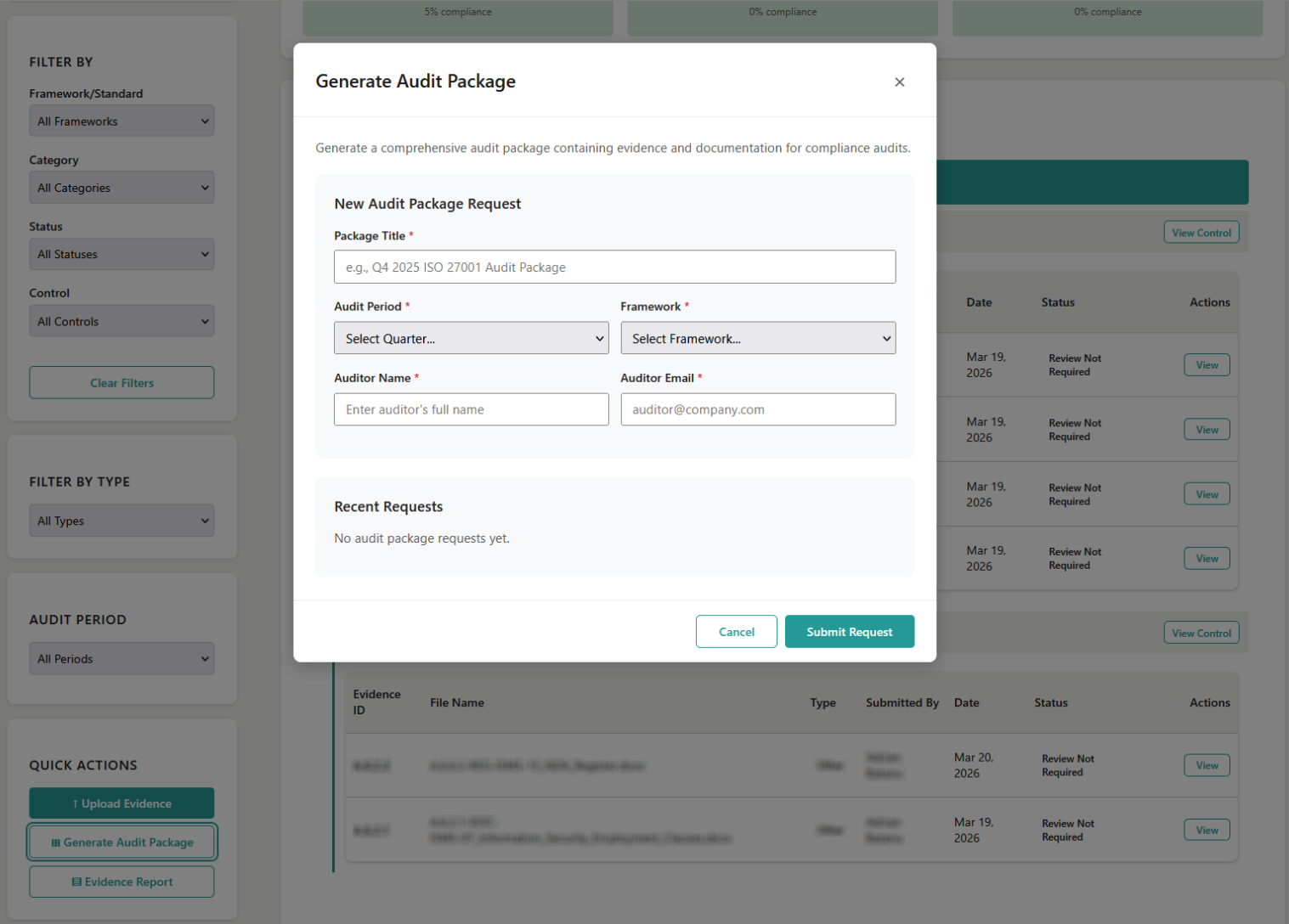
One example is the audit evidence package request. A user can create the request from the evidence area, choose the relevant audit period and framework, and then see the request status in the portal. Power Automate can process that request in the background, assemble the required information, update the same request record, and add a package location when the result is ready. The website can then expose the completed package from the request history.
The same pattern is used for policy upload requests. The web part extracts the information from an uploaded policy document and creates a structured request record for the next stage of processing. This keeps the browser experience responsive while preserving a visible history of what was requested and when.
The repository also contains workflow specifications for policy approvals, reminders, reviews, training notifications, risk follow-up, and audit activities. These flows are tenant-side components and are managed separately from the SPFx package. Keeping the boundary explicit made the solution easier to reason about: the web parts manage the user interaction and the List records, while Power Automate can manage the asynchronous work around them.
Bringing Reporting Into the Portal
The portal needed to show more than individual records. It also needed to make the overall state of the compliance programme easier to understand.
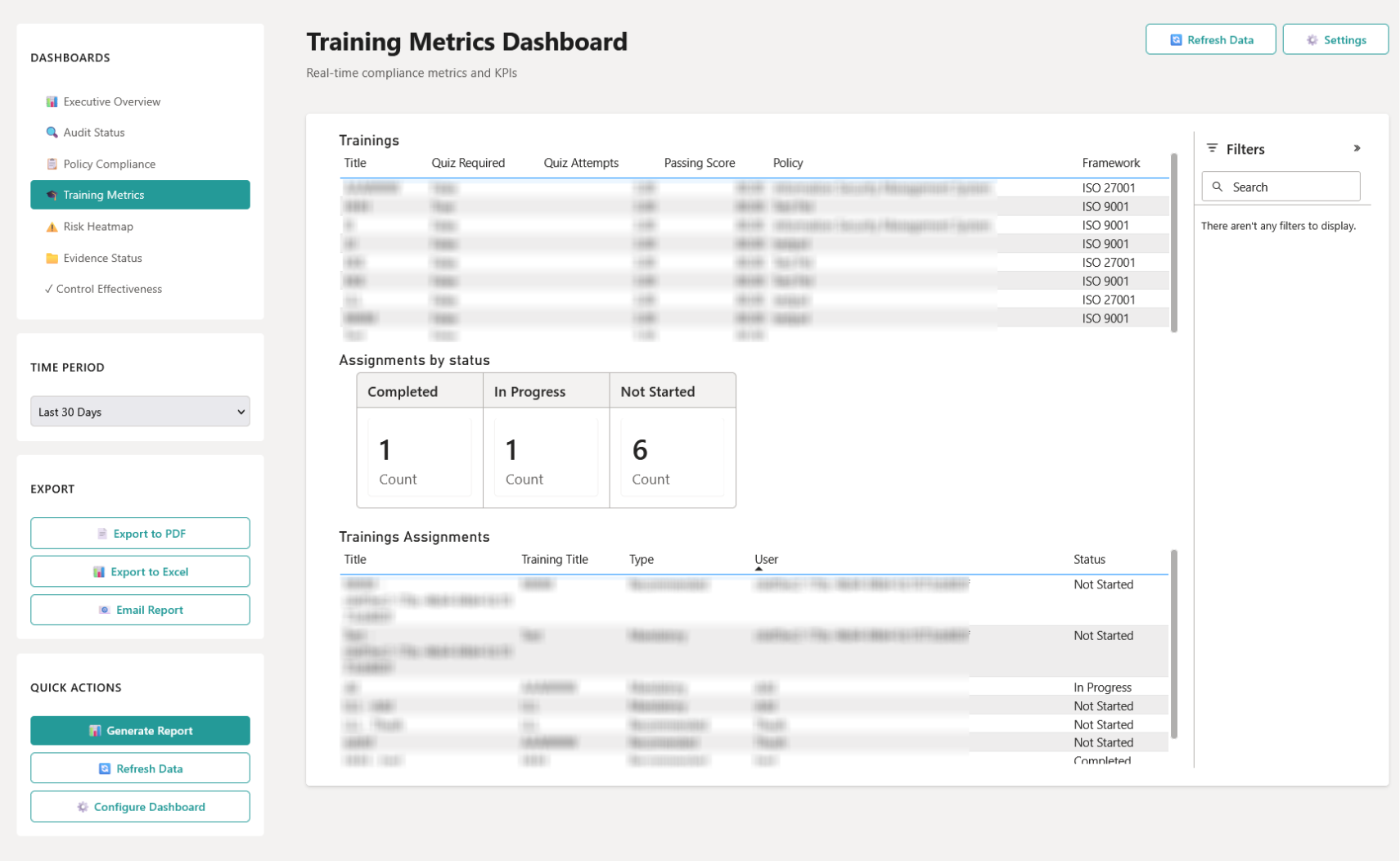
The homepage brings operational information together from SharePoint Lists. Depending on the user's role, this can include policy status, framework coverage, evidence activity, training completion, open risks, recent activity, and upcoming events or deadlines. Employees can focus on their own assigned policies and training, while administrative users can access broader indicators and navigation into the relevant areas.
For more advanced reporting, we embedded Power BI reports inside SharePoint. The dashboard web part supports configurable report URLs for the executive overview, audit status, policies, training, risks, evidence, and controls. That keeps reporting close to the processes and information it represents, without forcing users to move between a separate reporting portal and the operational website.
Power BI has a specific role in this solution: reporting and monitoring. It provides visibility into trends, status, and coverage. The website does not use it as a decision engine. Decisions such as approving a policy, reviewing evidence, or changing a risk status remain part of the defined process and the responsible user's work.
Authentication and Role-Based Access Control (RBAC)
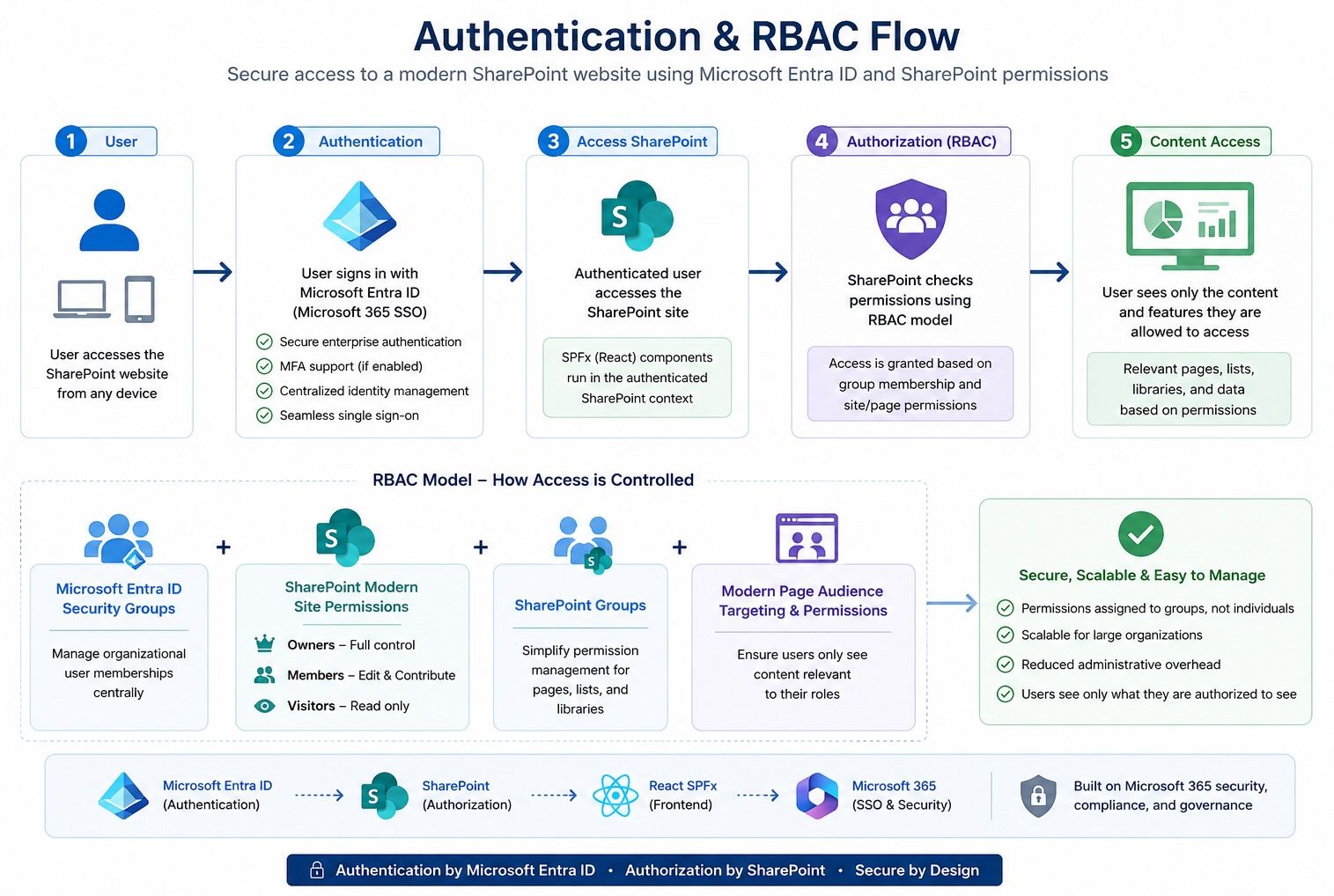
Security was a core design principle of the solution. Instead of implementing a custom authentication system, the website leverages Microsoft Entra ID for identity management and SharePoint's native permission model for authorization.
Authentication
Users authenticate using their organizational Microsoft Entra ID accounts through Microsoft 365's Single Sign-On (SSO). This provides:
- Secure enterprise authentication
- Seamless access without additional logins
- Centralized identity management
- Multi-Factor Authentication (MFA) support (if enabled by the organization)
Because authentication is handled by Microsoft 365, the React-based SPFx components automatically execute within the authenticated SharePoint context.
Authorization (RBAC)
Role-Based Access Control (RBAC) is implemented using a combination of Microsoft Entra ID groups, Microsoft 365 groups, and SharePoint site permissions.
The access model consists of:
- Microsoft Entra ID Security Groups for managing organizational user memberships.
- SharePoint Modern Site Permissions (Owners, Members, and Visitors) to define site-level access.
- SharePoint Groups to simplify permission management for pages, lists, and document libraries.
- Modern Page Audience Targeting and page permissions to ensure users only see content relevant to their roles.
Rather than assigning permissions to individual users, access is granted to groups, making administration scalable and reducing maintenance overhead.
Development and Deployment
The portal was developed using the SharePoint Framework (SPFx) with ReactJS, enabling reusable, component-based development while integrating seamlessly with SharePoint Online.
Development
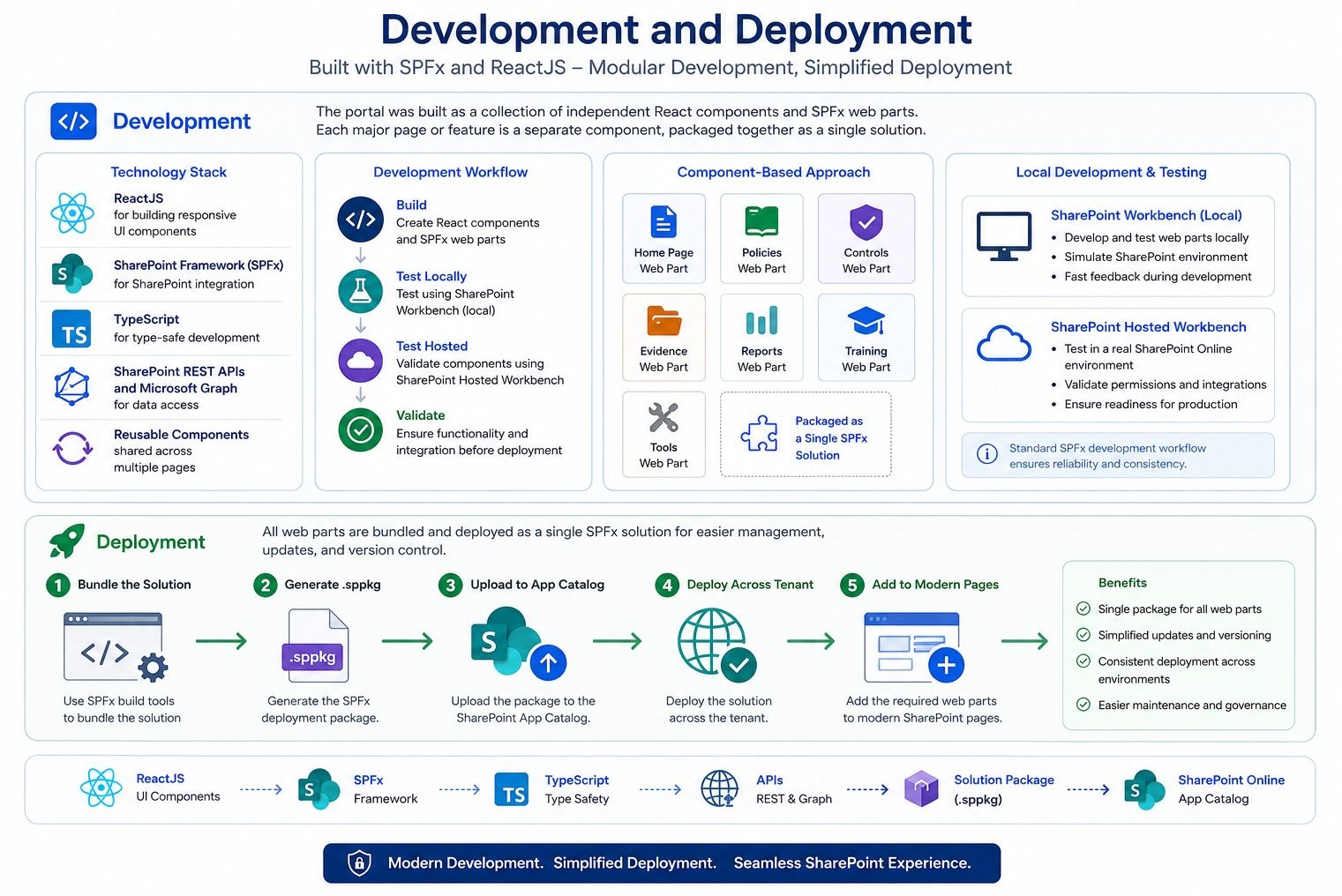
The application was built as a collection of independent React components and SPFx web parts, where each major page or feature was developed as a separate component. This modular approach improved maintainability, simplified testing, and allowed features to evolve independently.
Although the functionality was split across multiple web parts, they were packaged together as a single SPFx solution, making deployment and version management much simpler.
The development workflow included:
- ReactJS for building responsive UI components
- SharePoint Framework (SPFx) for SharePoint integration
- TypeScript for type-safe development
- SharePoint REST APIs and Microsoft Graph for data access
- Reusable components shared across multiple pages
- Local Development and Testing
During development, SharePoint's standard SPFx development workflow was used for local testing.
The application was tested using the local SharePoint Workbench and hosted Workbench, allowing individual web parts to be validated before deployment to SharePoint Online.
Deployment
After development was complete, the project was bundled and packaged into a single SPFx solution package (.sppkg).
Deployment was performed through the SharePoint App Catalog using the Manage Apps interface.
The deployment process consisted of:
- Bundle the solution using the SPFx build tools.
- Generate the .sppkg deployment package.
- Upload the package to the SharePoint App Catalog.
- Deploy the solution across the tenant.
- Add the required web parts to modern SharePoint pages.
Packaging all web parts into a single solution simplified application updates, versioning, and deployment across environments.
Power BI Development
Reporting and analytics were developed directly within the Power BI Service using its web interface.
Interactive dashboards were connected to SharePoint data sources and published for secure access within the SharePoint portal. Reports were then embedded into modern pages, allowing users to view analytics without leaving the application.
Power Automate Development
Business workflows were implemented using the Power Automate web portal.
Flows were designed to automate processes such as:
- Approval workflows
- Notifications
- List item updates
- Document processing
- Integration between Microsoft 365 services
These cloud flows were connected to SharePoint lists and document libraries, enabling business processes to run automatically without requiring custom backend services.
Conclusion
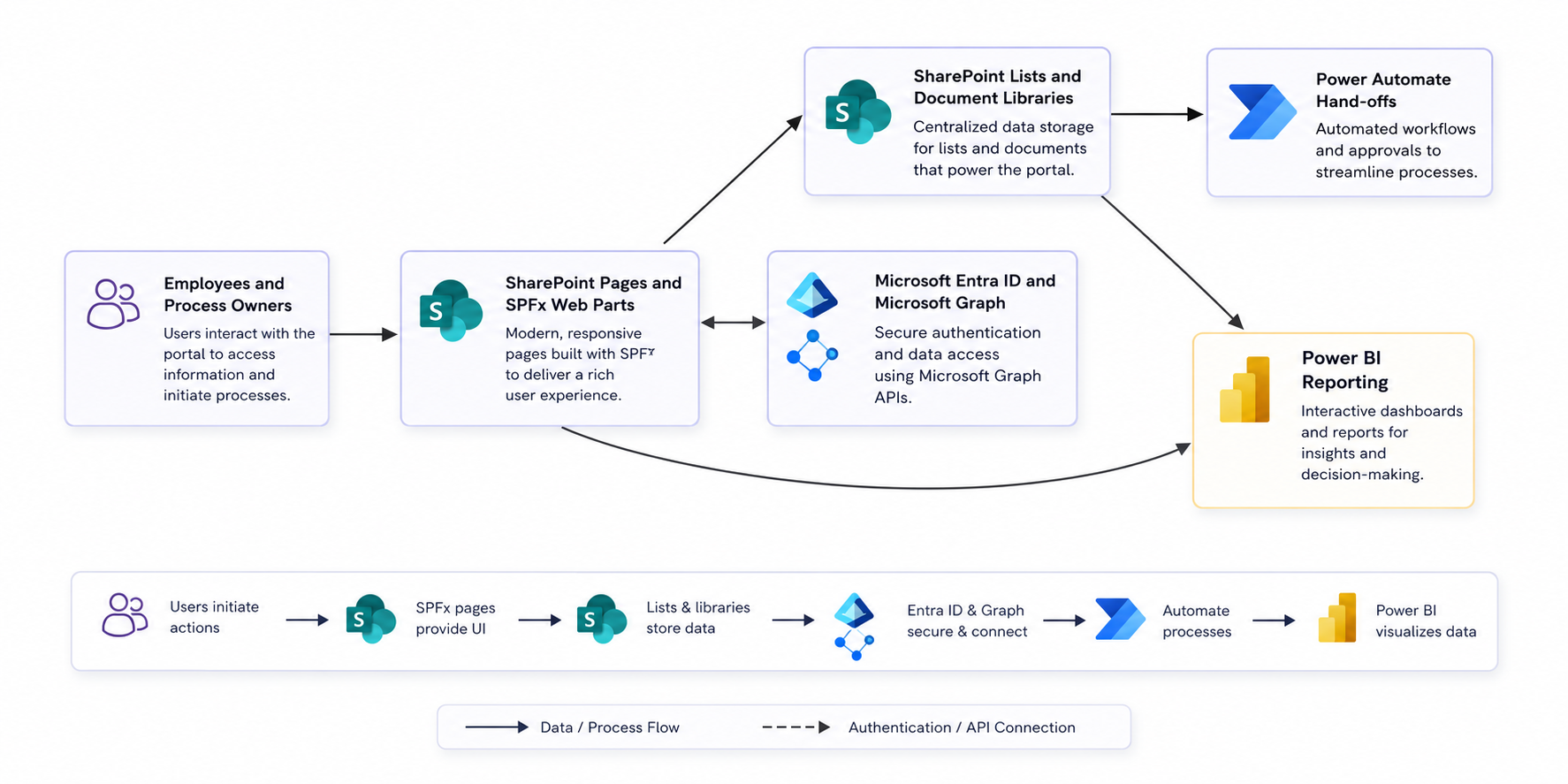
This project demonstrates that SharePoint can be much more than a document repository. By combining SharePoint Online, React-based SPFx web parts, Microsoft Entra ID, Power Automate, and Power BI, we built a unified platform that supports the day-to-day activities of an ISO compliance program while remaining entirely within the Microsoft 365 ecosystem.
Rather than relying on multiple disconnected applications, the solution brings together content management, business processes, reporting, authentication, and automation into a single experience. SharePoint Lists provide the structured data layer, document libraries manage files, SPFx delivers task-focused user interfaces, Power Automate handles long-running workflows, and Power BI provides operational visibility through interactive dashboards.
An important design decision was to keep responsibilities clearly separated. The web application focuses on user interaction and data management, Power Automate executes asynchronous business processes, Power BI delivers reporting and analytics, and Microsoft Entra ID, together with SharePoint permissions, enforces security and role-based access control. This separation makes the solution easier to maintain, extend, and evolve over time.
The result is a scalable, modular, and maintainable architecture that demonstrates how the Microsoft 365 platform can be used to build modern line-of-business applications—not by replacing SharePoint, but by extending it with the capabilities of the wider Microsoft ecosystem.